
A change order in construction is a written, signed amendment to your contract. It records a change to the work after the contract is signed: what is being added, removed or swapped, how that changes the price, and how it changes the schedule. Once both sides sign, it becomes part of the contract. If the change isn't on a signed change order, you're left arguing about a conversation.
Change orders aren't a sign that something went wrong. You may decide you want more outlets once you see the cabinets in place, or the crew may find a problem behind a wall that nobody could have seen. What matters is how the change is handled. This guide covers what a change order means, what belongs on one, a worked example, and what to check before you sign.
What a change order means in plain terms
Your contract sets out the scope, price and schedule that you and your contractor agreed on. A change order is how you and the contractor agree to change any of those three things. Think of it as a small contract that attaches to the big one.
California's Contractors State License Board (CSLB) puts it simply: if you've added or subtracted work, substituted materials or equipment, or changed the completion date, note it in writing on a change order and include any price changes. The board adds that after a change order is signed, it becomes part of the written contract.
When you need a change order
You need one any time the work, the materials, the price or the finish date moves away from what the contract says. Common examples:
You ask for something new. Extra outlets, a different tile layout, a window that wasn't in the plan.
You take something out. Removing work should lower the price, so it belongs on a change order too, with the credit shown.
A hidden condition turns up. Rotted subfloor, old wiring or a pipe in the wall you planned to move.
A material is swapped. The product in the contract is out of stock, or you've chosen a different one.
An allowance goes over or under. If you spend more or less than an allowance in your contract, the difference is usually settled with a change order.
The date moves. Even a change with no price effect should be written down if it changes the finish date.
What a change order should include
There's no single national form, and the rules depend on where you live. A clear change order usually has these parts:
Project details: your name, the job address, the contractor's name and license number, and the date of the original contract.
A change order number, so you can tell them apart and keep them in order.
A description of the change, specific enough that nobody can read it two ways. Include brand, model and quantity where they matter.
The reason for the change, such as an owner request or a hidden condition.
The price change, showing materials and labor, and any fee or markup the contractor charges on changes.
The new contract total, so you always know where the job stands.
The schedule change, in days, and the new expected finish date.
How payment works: whether the amount is added to the next payment or billed some other way.
Signatures and dates from both you and the contractor.
A change order example
Here's what a simple one looks like for a kitchen remodel. All of these prices and dates are made-up examples to show the layout and the math, not real costs for your project.
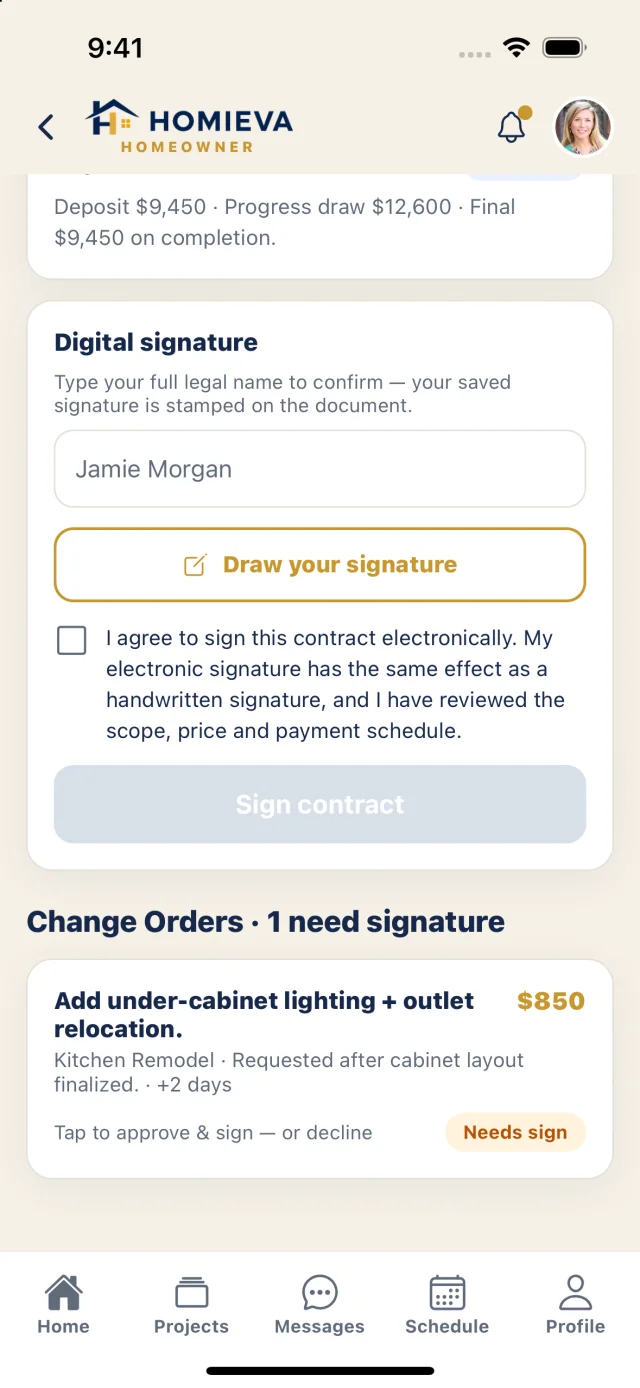
Change Order No. 1. Project: kitchen remodel at the homeowner's address. Reason: owner request, after the cabinet layout was finalized.
Description: add under-cabinet lighting along the main wall and move one outlet.
Price: $300 materials plus $550 labor, for an added cost of $850.
Contract total: original contract $31,500, plus this change of $850, for a new total of $32,350.
Schedule: adds 2 working days. The new expected finish date is written here.
Payment: the $850 is added to the final payment. Both sides sign and date below.
If you were removing work instead, the same form would show a credit: a negative amount, and a lower contract total.
Do change orders have to be in writing?
It depends on your state and your contract, but written and signed is the standard to hold everyone to. Some states put this in their rules. In California, the CSLB says home improvement projects over $500 in combined labor and materials need a written contract, and that any changes to it must be in writing, legible, easy to understand, and must inform you of your rights to cancel or rescind.
In Virginia, the Board for Contractors' rules say a residential contract must state that any modification changing the cost, materials, work to be performed or estimated completion date must be in writing and signed by all parties.
Other states set their own rules, and many contracts have their own clause on changes. Read yours before work starts, and check with your state's contractor licensing board. For a question about your specific contract, a licensed attorney can help.
How to review a change order before you sign
Read the description first. Does it say exactly what you think you're getting? "Additional electrical work" could mean almost anything; "add four LED under-cabinet lights on one dimmer switch" can't.
Ask how the price was worked out. Ask to see materials and labor separately, and whether a markup is included. If your contract already sets a rate for changes, check that it was used.
Check the schedule line. A change can cost you days as well as dollars, and a small delay can push back the trades that come after it. If the line is blank, ask why.
For a hidden problem, ask to see it. Have the contractor show you the rot or the old wiring, or send photos, before the wall is closed up.
Ask whether the work needs a new or revised permit or an added inspection, and who will handle it.
Don't feel rushed. Sometimes a crew does need a quick answer so the job doesn't stall, but a short delay to read one page is reasonable. If the work is urgent, you can still get the scope and price in writing, by text or email, before it starts, then put it on the formal change order. Never sign a blank or partly filled-in form.
How to keep change orders under control
Change orders are the usual reason a final bill ends up higher than the first one, and most of the pressure comes from a few habits you can change before work starts.
Agree on the process up front. It's one of the questions to ask a contractor before hiring: how do you handle changes, and how are they priced? Before you sign the contract, make sure the answer is in it.
Make your choices early. Every finish you pick before signing is one less change to price later.
Keep a cushion for surprises. Hidden conditions are hard to predict, so keep some of your own budget set aside rather than planning to spend every dollar on the contract price.
Keep a running total. Add each signed change order to your contract total as it happens, so you know the real number before the final invoice arrives.
Save every signed copy with your contract, receipts and warranties. They're the record of what was actually built in your home and what you paid for it.
When you compare quotes, watch for bids that look low because they left things out. Those gaps often come back later as change orders, which is why it pays to compare bids line by line before you choose.
Keep every change on one record
In Homieva, change orders are signed amendments to your contract. Each one shows the price, the reason and the schedule impact before you approve or decline, and once it's signed, the contract value and schedule update on the same Project ID, with an audit trail. Nothing gets lost in a text thread, and you can see the running total as the job moves. You can see how it works for homeowners or open the live demo with sample data.